ASUS Jelly75 Keyboard KD201 Full Review

A Stylish 75% Mechanical Keyboard Built for Everyday Flexibility
The ASUS Jelly75 Keyboard KD201 stands out in a crowded mechanical keyboard market by blending playful aesthetics with practical functionality. It is designed as a compact 75% keyboard and it is specifically caters to users who want a space-saving layout without giving up essential keys like the function row and arrow cluster. Beyond its looks, the Jelly75 also offers tri-mode connectivity, hot-swappable switches, and a gasket-mounted structure, a feature typically found in enthusiast-grade boards.
But does it deliver a satisfying typing experience for its price at RM379 in Malaysia? Let’s dive into the details in this review.
Design & Build Quality
At first glance, the Jelly75 lives up to its name with its translucent, smoky chassis paired with vibrant keycap colorways such as Orange Meadow and Volt Green. The retro-inspired aesthetic gives it personality while it doesn’t look like your typical gaming keyboard filled with RGB effects. Instead, it feels more at home on a creative desk setup or minimalist workspace.
The 75% keyboard layout keeps things compact while maintaining practicality. You still get dedicated arrow keys and a function row, but the overall footprint is noticeably smaller than a full-size keyboard. The keys are closely arranged, which maximizes space efficiency, though users accustomed to “exploded” layouts may need a short adjustment period.
Weighing around 1.19kg, the Jelly75 feels sturdy and stable on the desk. It doesn’t shift around easily during intense typing sessions. The board uses a gasket-mount structure with ASUS’ Uni-Cushion design, which helps soften keystrokes and reduce vibration. This contributes to a more premium feel compared to basic tray-mounted keyboards.
The tall, SA-like keycaps enhance the retro vibe and provide a comfortable surface for typing. While they look high-end, they are not premium doubleshot PBT caps which is something enthusiasts may take note of.
Typing Experience

Typing on the Jelly75 is generally pleasant and smooth. The keyboard comes with linear mechanical switches that feel consistent and relatively well-lubed from the factory. Keystrokes are fluid, with a soft bottom-out thanks to the gasket structure. For writers, office users, or students, it offers a comfortable daily typing experience.
Sound-wise, the board delivers a fairly muted and cushioned profile. It’s not overly loud, making it suitable for shared workspaces or home offices.

However, the stabilizers on larger keys like the Spacebar can feel slightly rattly out of the box. Enthusiasts who are particular about acoustics may want to mod or relube them for an improved sound signature. For casual users, the issue however is not deal-breaking at all, since the positioning of this keyboard is toward comfort use.
Another small drawback is the lack of a clear Caps Lock indicator. This can occasionally lead to accidental uppercase typing without immediate feedback, which is something the user should take note of it.
Connectivity & Features

One of the Jelly75’s strongest selling points is its tri-mode connectivity. It supports:
- USB-C wired connection
- 2.4GHz wireless
- Bluetooth (with support for multiple device pairing)
This makes it ideal for users juggling between a laptop, desktop, tablet, or even a smartphone. Switching between devices is seamless, which is perfect for hybrid working setups.
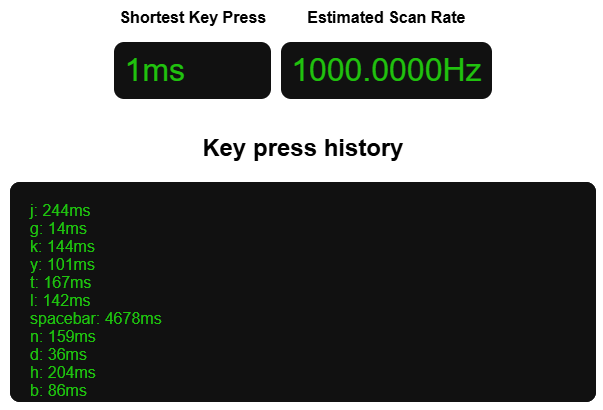
Performance-wise, the polling rate goes up to 1000Hz in wired mode and 500Hz via 2.4GHz wireless. For everyday use and casual gaming, responsiveness feels snappy and reliable.

The keyboard also features hot-swappable sockets, allowing users to replace switches without soldering. This is a huge plus for those who want to experiment with different switch types later on.

Lighting is limited to white backlighting with adjustable brightness levels. There’s no RGB here which may disappoint gamers but will appeal to users who prefer a clean, distraction-free look.
Battery Life

Battery performance is another highlight. Equipped with a 4000mAh battery, the Jelly75 is rated for extremely long usage when the backlight is turned off. In real-world scenarios, this translates to weeks or even months of usage before needing a recharge, depending on how frequently it’s used.
For wireless users, this kind of longevity is a major advantage.
Pros & Cons
Pros
- Unique translucent design with attractive color options
- Comfortable gasket-mounted typing feel
- Hot-swappable switches
- Tri-mode connectivity with multi-device support
- Excellent battery life
- Compact yet functional 75% layout
Cons
- Stabilizers could be better tuned
- No RGB lighting (white backlight only)
- No clear Caps Lock indicator
- Keycaps are not premium PBT
Final Verdict

The ASUS Jelly75 KD201 is a stylish and versatile mechanical keyboard that prioritizes comfort, flexibility, and everyday usability. It isn’t aimed at hardcore gaming enthusiasts or serious keyboard modders, but it delivers a well-rounded experience for students, office workers, and casual users who value both aesthetics and practicality.
With its tri-mode connectivity, hot-swappable switches, and cushioned typing feel, it offers strong value within its segment. While it has minor shortcomings particularly in stabilizer tuning and the absence of RGB, but these don’t overshadow its overall appeal.
If you’re looking for a compact mechanical keyboard with personality and reliable performance, the Jelly75 KD201 is certainly worth considering for your setup.
When it comes to the price, the Jelly75 KD201 is selling at RM379 to RM379, for more information and purchasing links, click the below to find out more
Shopee
https://s.shopee.com.my/8KkE1BEWal
https://s.shopee.com.my/AABsCY7Xs8
Product Link
https://www.asus.com/my/accessories/keyboards/asus-keyboard/asus-jelly75-keyboard-kd201/