ASUS Zenbook S 14 (UX5406A) Full Review: One of the Best Premium Ultrabooks You Can Buy

When it comes to premium ultraportable laptops, ASUS has consistently managed to strike a good balance between design, performance and portability. The ASUS Zenbook S 14 (UX5406A) continues that approach, but takes things a step further with an incredibly slim chassis, a gorgeous OLED display and Intel’s latest Core Ultra platform.
What makes the Zenbook S 14 interesting isn’t simply its specifications. This is a laptop designed to be carried around every day, yet it still packs enough performance for demanding productivity work, content creation and even some casual gaming.
At just around 1.2kg and approximately 1.1cm thin, the Zenbook S 14 is the kind of laptop that disappears into a backpack. Yet, once you open it up, you’re greeted by a 14-inch 3K 120Hz OLED touchscreen and a surprisingly powerful processor. After using it as a daily productivity machine, here is my take on the ASUS Zenbook S 14 (UX5406A).
Premium Design That Feels Surprisingly Solid
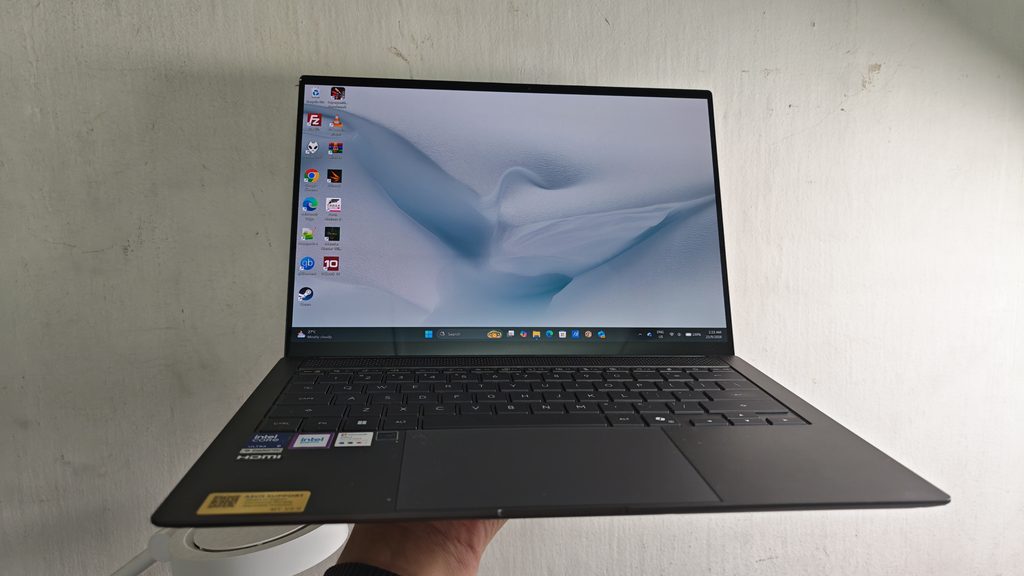
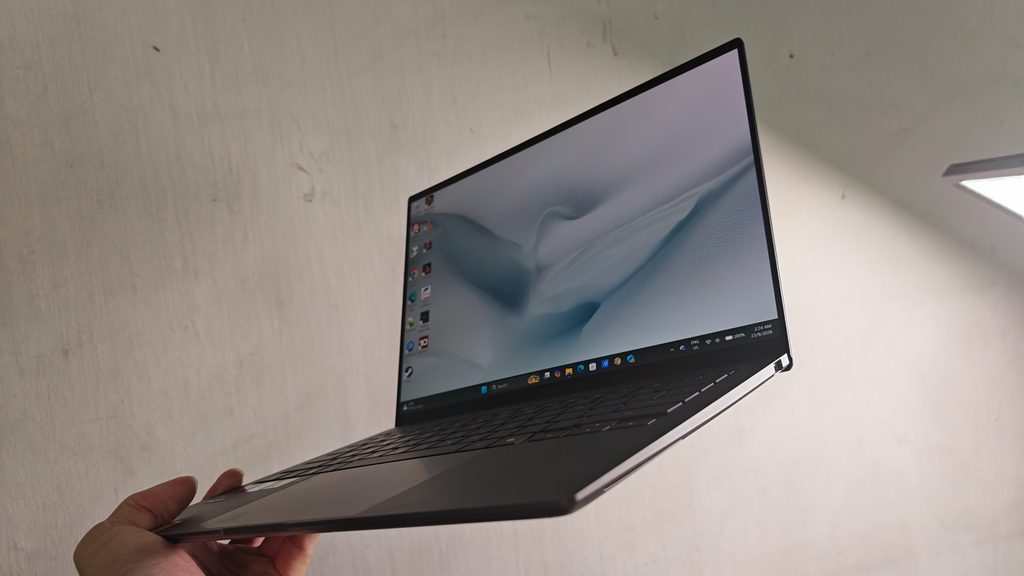
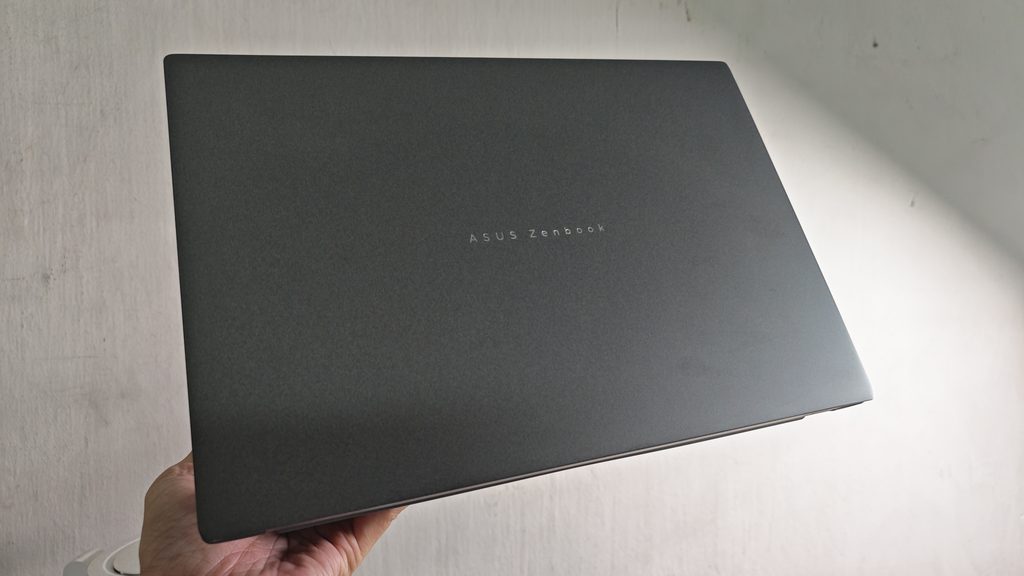
The Zenbook S 14 immediately gives you that premium impression when you pick it up. Despite being extremely thin and light, ASUS hasn’t made the laptop feel fragile. The chassis uses the company’s Ceraluminum material, giving it a distinctive finish while maintaining the rigidity you’d expect from a premium laptop.
The minimalist design works particularly well. There aren’t unnecessary lines or aggressive styling elements, making the Zenbook S 14 equally suitable for an office, meeting room, university or café.
The biggest advantage is, of course, portability. At around 1.2kg, carrying the laptop around throughout the day is barely noticeable. This is especially useful for users who travel frequently or move between different locations for work. The slim profile is another major highlight. At roughly 1.1cm thick, the Zenbook S 14 looks impressively sleek when placed next to a conventional laptop.
Despite the thin chassis, ASUS has still managed to include a reasonable selection of ports, which makes the laptop much more practical for everyday use.
A Stunning 3K 120Hz OLED Display
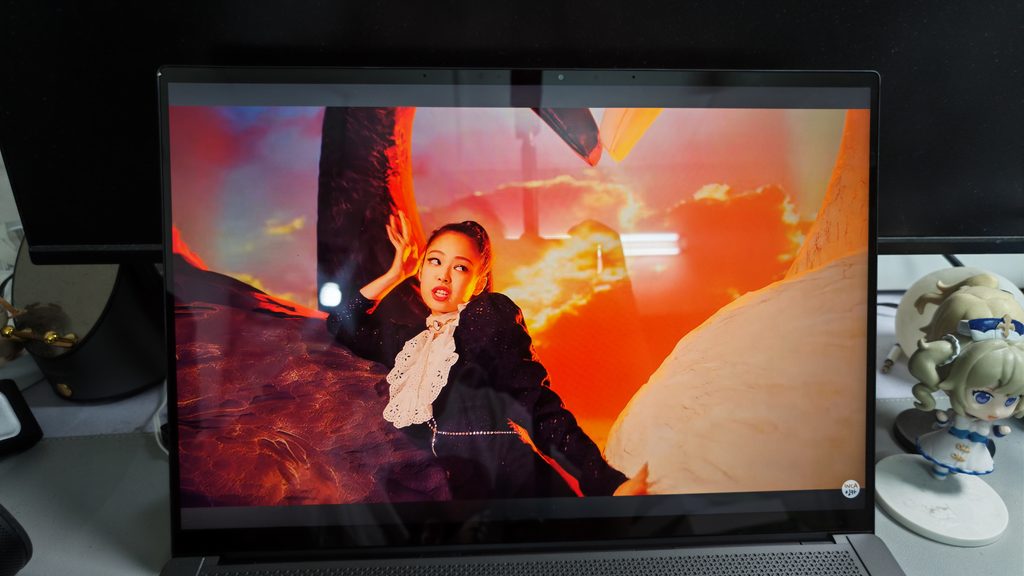
If the design gets your attention, the display is probably what will make you want to keep using the Zenbook S 14. The laptop features a 14-inch 3K OLED touchscreen with a 2880 x 1800 resolution and 120Hz refresh rate. The 16:10 aspect ratio also gives you more vertical screen space, which is useful when working with documents, websites and spreadsheets.
OLED technology makes a noticeable difference. Colours look vibrant, blacks are deep and contrast is excellent. Watching movies and YouTube videos is particularly enjoyable, while photos also look great on the display. The wide colour gamut is another advantage for creative users. ASUS lists 100% DCI-P3 colour coverage, making the display suitable for photo editing and other colour-sensitive work.
The 120Hz refresh rate is equally welcome. Scrolling through webpages feels much smoother, and Windows animations have a more fluid appearance compared with a conventional 60Hz panel. The touchscreen adds another layer of versatility. While I wouldn’t necessarily use touch for everything, it can be convenient for navigating certain applications, annotating documents or quickly interacting with content.
The only minor downside is that, like most glossy OLED panels, reflections can become noticeable when you’re working under strong lighting.
Core Ultra 9 Performance in an Ultra-Thin Body

The configuration reviewed here comes with an Intel Core Ultra 9 386H processor, paired with 32GB of LPDDR5X RAM and a 1TB PCIe 4.0 SSD. For everyday productivity, this is considerably more power than most users will need. Running multiple Chrome tabs alongside Microsoft Office, email, messaging applications and other background tasks is effortless. With 32GB of memory, there’s also plenty of headroom for heavier multitasking.

For my typical workflow, the Zenbook S 14 feels fast and responsive. Applications launch quickly, switching between programs is smooth and there is very little waiting around.
It also handles creative workloads reasonably well. Photo editing, light video editing and other content creation tasks are perfectly realistic on this machine.

The Zenbook S 14 uses integrated graphics rather than a dedicated GPU. That means it isn’t designed to compete with gaming laptops equipped with NVIDIA GeForce RTX graphics.
Casual games and less demanding titles are fine, but if you’re looking for a machine primarily for AAA gaming, this isn’t the laptop to buy. For everyone else, however, the balance between performance and portability is excellent.
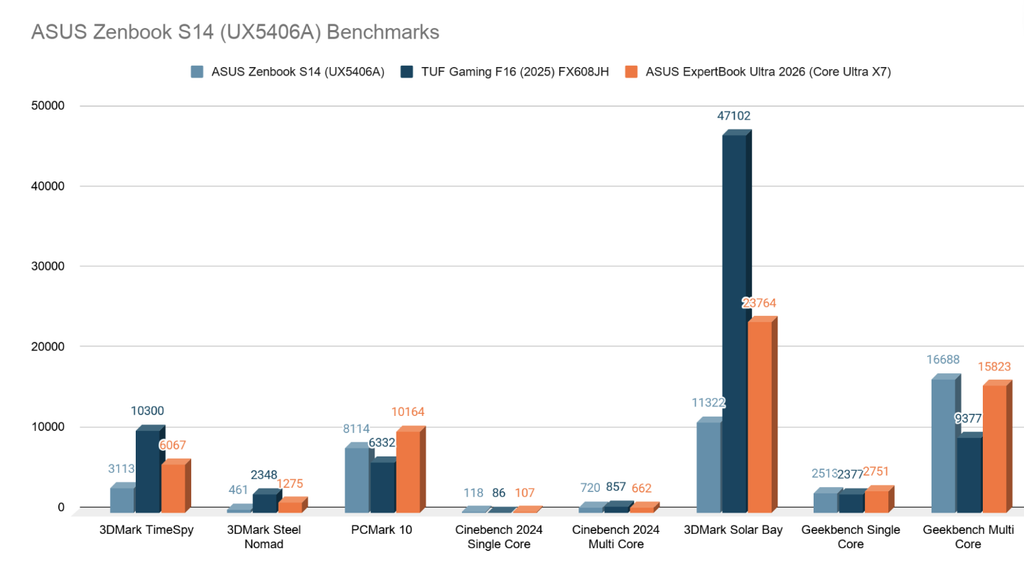
The above is the rest of the synthetic benchmarks score.
Built for the AI PC Era
The Core Ultra platform also brings dedicated AI processing capabilities to the Zenbook S 14. The integrated NPU is designed to handle compatible AI workloads more efficiently, allowing certain tasks to be processed locally rather than relying entirely on the CPU or cloud services. For users who regularly use AI-assisted productivity features, image processing, video effects or Windows Copilot+ capabilities, this gives the Zenbook S 14 some useful additional headroom.
While AI features aren’t necessarily the reason most people will buy this laptop today, having dedicated hardware for these workloads makes the machine more future-ready as software developers increasingly integrate AI into everyday applications.
Cooling Performance Is Better Than Expected

Packing a high-performance processor into a chassis this slim inevitably creates a challenge for cooling. ASUS addresses this with a redesigned cooling system featuring dual fans and a vapor chamber.
The result is surprisingly good for an ultraportable. During normal tasks such as browsing, writing and watching videos, the laptop remains relatively quiet. Once you start pushing the processor with heavier workloads, the fans become more noticeable, which is expected.
What impressed me is that ASUS has managed to maintain this level of performance without turning the Zenbook S 14 into a constantly noisy machine. For a laptop this thin, that’s a considerable achievement.
Comfortable Keyboard and Large Touchpad
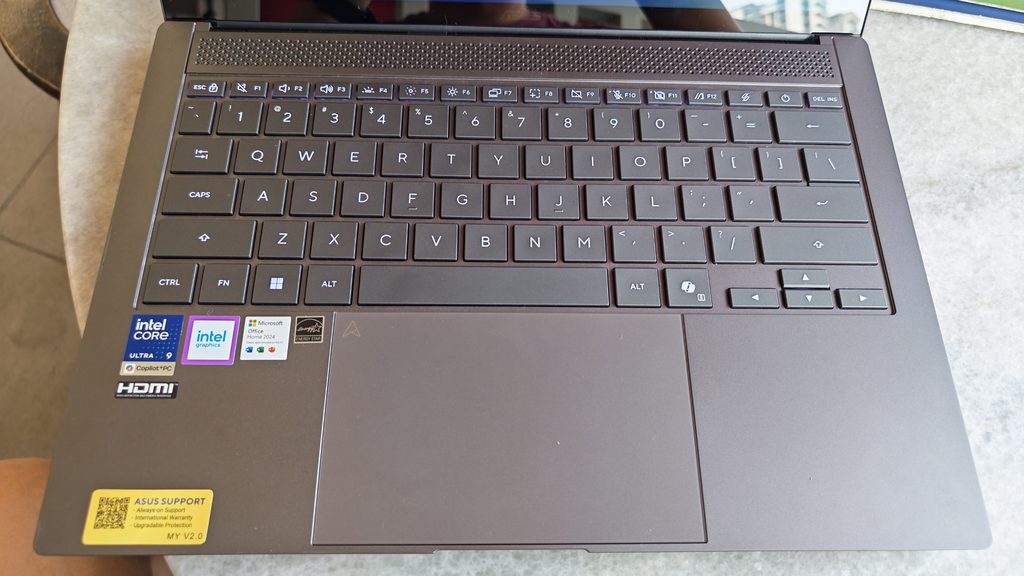
A thin laptop can sometimes compromise the typing experience, but that isn’t really the case here. The Zenbook S 14’s keyboard provides a comfortable typing experience with around 1.1mm of key travel. The keys have a good layout and are responsive enough for longer typing sessions.
For someone who spends a lot of time writing articles, emails or documents, I found the keyboard more than adequate. The backlighting also makes it easier to work in darker environments.

The large ErgoSense touchpad complements the keyboard nicely. It provides plenty of room for Windows gestures and navigation, including quick controls for volume and display brightness sliding, reducing the need to constantly reach for a mouse. Overall, the input experience feels appropriately premium and well suited to productivity.
Surprisingly Good Audio

The Zenbook S 14 also delivers a better multimedia experience than its size might suggest. ASUS equips it with a four-speaker audio system, and the speakers produce a reasonably spacious sound for such a thin laptop.
Voices are clear, making it good for video calls and online meetings, while music and movies have enough detail to make the built-in speakers enjoyable. Naturally, dedicated headphones or speakers will still provide better sound, but I rarely felt the need to connect external speakers for casual entertainment.
Plenty of Connectivity
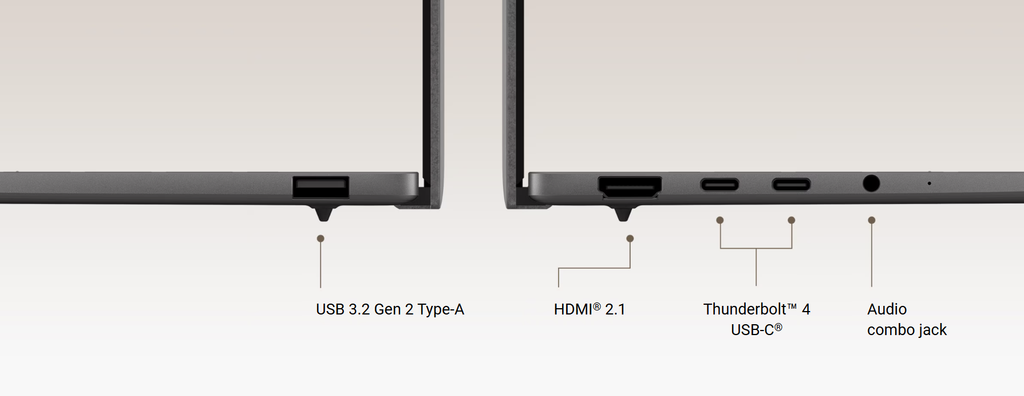
Another positive aspect is the selection of ports. The Zenbook S 14 includes two Thunderbolt 4 USB-C ports, a USB-A port, HDMI 2.1 and a 3.5mm headphone jack. Wireless connectivity is also modern, with Wi-Fi 7 and Bluetooth 5.4 support. Having a full-size USB-A port is especially useful because you don’t need to carry an adapter every time you want to connect an older USB accessory.
The Thunderbolt 4 ports also provide plenty of flexibility for external displays, storage and docking solutions. For a laptop this thin, ASUS has done a good job of avoiding the “dongle everything” approach.
Battery Life for a Full Day
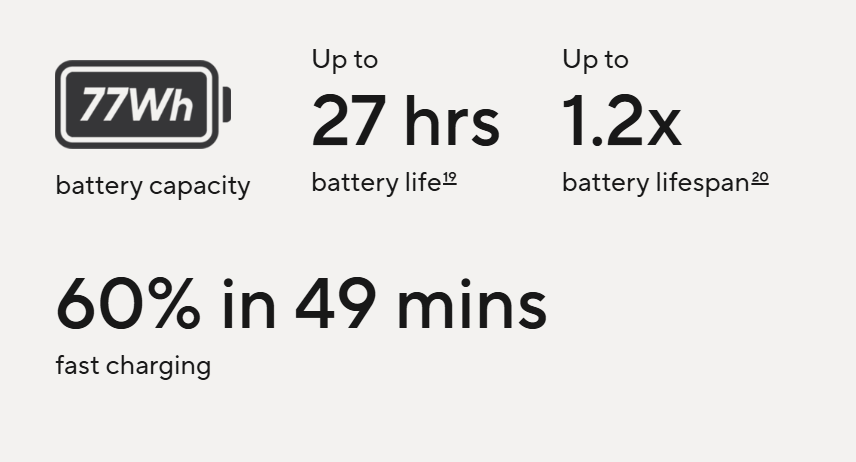
Inside the Zenbook S 14 is a relatively large 77Wh battery, which is impressive considering its compact dimensions. ASUS claims up to 27 hours of battery life under its own testing conditions, although real-world results will naturally vary depending on brightness, refresh rate, applications and workload. In everyday use, the battery is more than capable of handling a substantial amount of work away from a power outlet.
This combination of a large battery and an efficient modern processor is particularly useful for people who travel frequently. USB-C charging is another convenience, and ASUS states that the battery can reach 60% in approximately 49 minutes under specified conditions.
Is the ASUS Zenbook S 14 Worth Buying?

After spending time with the Zenbook S 14, I think its biggest strength is the overall balance.
There are laptops that are more powerful, laptops that offer dedicated graphics and laptops that are cheaper. But finding a machine that combines this level of performance, display quality and battery capacity while remaining around 1.2kg is much harder.
The OLED display is excellent, the Core Ultra 9 processor provides plenty of performance and 32GB RAM gives the laptop enough breathing room for demanding multitasking.
At the same time, the compact dimensions mean you can realistically take it almost anywhere. The main compromises are fairly predictable. The integrated graphics aren’t aimed at serious gaming, and the soldered memory means you need to choose your RAM configuration carefully when purchasing.
For productivity-focused users, professionals, students, frequent travellers and content creators who don’t require a dedicated GPU, however, these compromises are relatively easy to accept.
Verdict, Pricing & Conclusion

The ASUS Zenbook S 14 (UX5406A) is an excellent premium ultraportable that manages to deliver a surprisingly complete package in an incredibly thin chassis. Its 3K 120Hz OLED touchscreen is one of the biggest highlights, while the Core Ultra 9 386H, 32GB RAM and 1TB SSD provide more than enough performance for everyday productivity and many creative workloads.
What I like most is that the Zenbook S 14 doesn’t feel like a laptop designed around a single specification. Everything works together. It’s thin enough to carry everywhere, powerful enough to handle serious work, has a fantastic display and still provides useful connectivity.
It may not be the laptop for hardcore gamers or users who need upgradeable memory, but for everyone else looking for a premium Windows ultraportable, the Zenbook S 14 is a very compelling choice.
Pros
- Extremely thin and lightweight
- Premium Ceraluminum construction
- Excellent 3K 120Hz OLED touchscreen
- Powerful Core Ultra 9 processor
- 32GB RAM and 1TB SSD
- Large 77Wh battery
- Good AI/NPU capabilities
- Comfortable keyboard and large touchpad
- Four-speaker audio
- Wi-Fi 7 and Thunderbolt 4
- Useful selection of ports
Cons
- Integrated graphics limit gaming performance
- RAM isn’t upgradeable
- Glossy OLED display can reflect surrounding light
- Premium price
- Limited internal upgrade options
ASUS Zenbook S 14 (UX5406A) is a laptop that gets the fundamentals right while pushing portability to another level. For users who want a premium, lightweight Windows laptop without sacrificing too much performance, this is easily one of the more attractive options in its class. When it comes to the price, that will be from RM7699 onwards with variable configurations online, For more information, click here to find out.