6 Ways the Samsung Galaxy S26 Ultra Can Become Your All-in-One Content Creation Studio
Creating great content takes more than a capable camera. From capturing steady footage to editing photos and videos, creators need tools that can handle the entire process without carrying bulky equipment.
The Samsung Galaxy S26 Ultra brings together an advanced camera system, Galaxy AI features and support for various creative apps, making it a versatile device for photographers, vloggers and social media creators.
Here are six ways to make the most of its content creation capabilities.
1. Capture Steady Footage Anywhere
Whether you’re jogging, exploring a night market or recording an event, shaky footage can affect the final result.
The Galaxy S26 Ultra features Super Steady with Horizontal Lock, which uses its gyroscope and accelerometer to keep videos level, even when the phone is tilted or rotated up to 360 degrees. It helps creators capture smoother footage without relying on an external gimbal.
Its camera system also offers a 200MP main camera, 50MP ultra-wide camera and 50MP telephoto camera, with 3x and 5x optical zoom for capturing everything from landscapes to distant subjects.
2. Get More Control Over Photography and Video
For creators who prefer manual adjustments, the Galaxy S26 Ultra offers Pro and Pro Video modes. These provide control over settings such as ISO, shutter speed, focus and white balance.
Video recording supports up to 8K at 30fps and 4K at 120fps in Pro Video mode, giving users more flexibility for cinematic footage and slow-motion sequences. It also supports the Advanced Professional Video (APV) codec, designed to preserve image quality through repeated editing.
Photography enthusiasts can explore Samsung’s Expert RAW app, while third-party options such as ProShot and MotionCam Pro offer additional creative controls.
3. Enhance Photos with Galaxy AI
Capturing a good photo is only the beginning. Samsung’s Photo Assist and Creative Studio make editing more accessible through Galaxy AI.
With natural-language prompts, users can request changes such as removing unwanted objects, repositioning subjects or adding new elements. Creative Studio also allows users to create personalised stickers and visual assets.
For more advanced editing, apps such as Adobe Lightroom, Snapseed and Adobe Photoshop Express provide additional tools for colour correction, exposure adjustments and image enhancement.
4. Edit Videos Directly on Your Phone
A desktop editing setup is no longer essential for producing social media videos. Apps such as CapCut and VN Video Editor offer tools for trimming clips, adding transitions, applying effects and generating subtitles.
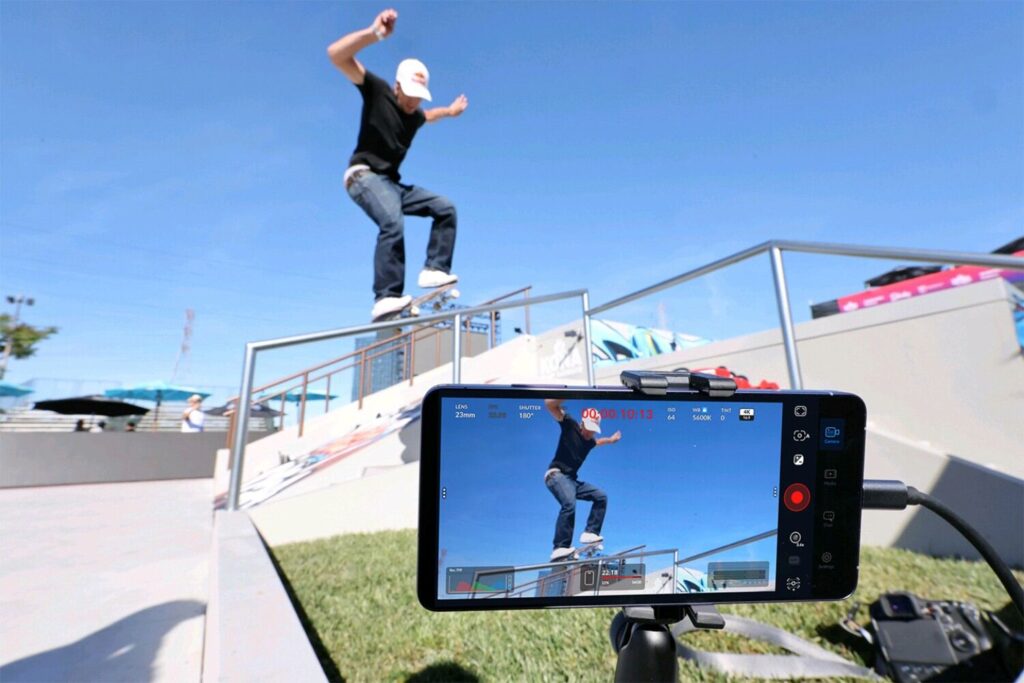
Creators looking for more professional recording controls can also explore Blackmagic Camera, although compatibility should be checked before installation. Samsung’s native Pro Video mode remains a useful alternative.
5. Create Content for Multiple Platforms
One recording session can produce content for several platforms, including Instagram Reels, TikTok, YouTube Shorts and longer videos.
The Galaxy S26 Ultra’s different camera focal lengths and recording options provide flexibility when capturing footage. Meanwhile, Canva can help create thumbnails and promotional graphics, while Lightroom presets and CapCut templates make it easier to maintain a consistent visual style.
6. Shoot, Edit and Share on One Device
One of the biggest advantages of the Galaxy S26 Ultra is having the entire creative workflow in one device. Users can capture high-resolution photos, enhance them with Galaxy AI, edit videos and share completed content through Quick Share.
With its versatile cameras, advanced stabilisation, professional video features and wide selection of editing apps, the Galaxy S26 Ultra offers creators a convenient way to produce content wherever they go.
Samsung Galaxy S26 Series Promotions in Malaysia
Samsung is offering rebates of up to RM700 when purchasing selected Galaxy S26 Series models until 31 December 2026.
| Model | Storage | RRP | Rebate | Promo Price |
|---|---|---|---|---|
| Galaxy S26 Ultra | 1TB | RM8,399 | RM700 | RM7,699 |
| Galaxy S26 Ultra | 512GB | RM6,799 | RM700 | RM6,099 |
| Galaxy S26 Ultra | 256GB | RM5,999 | RM700 | RM5,299 |
| Galaxy S26+ | 512GB | RM6,199 | RM600 | RM5,599 |
| Galaxy S26+ | 256GB | RM5,399 | RM300 | RM5,099 |
| Galaxy S26 | 512GB | RM5,499 | RM600 | RM4,899 |
| Galaxy S26 | 256GB | RM4,699 | RM300 | RM4,399 |
For more information or to purchase the Samsung Galaxy S26 Series, visit the official Samsung Malaysia website.